The tagging system in WAMM.chat allows structuring workflows and optimizing customer base management. Tags are short labels that can be added to any chat for categorization and quick search.
Multiple tags can be assigned to each conversation, enabling chats to be classified by various parameters: request type, processing status, responsible department, or priority level.
Business Benefits of Using Tags
- Faster search for specific conversations in a large customer database
- Structuring the customer base by segments and categories
- Simplified analytics on request types
- Organization of workflows between company departments
- Prioritization of customer inquiries
How to Use Tags in Daily Work
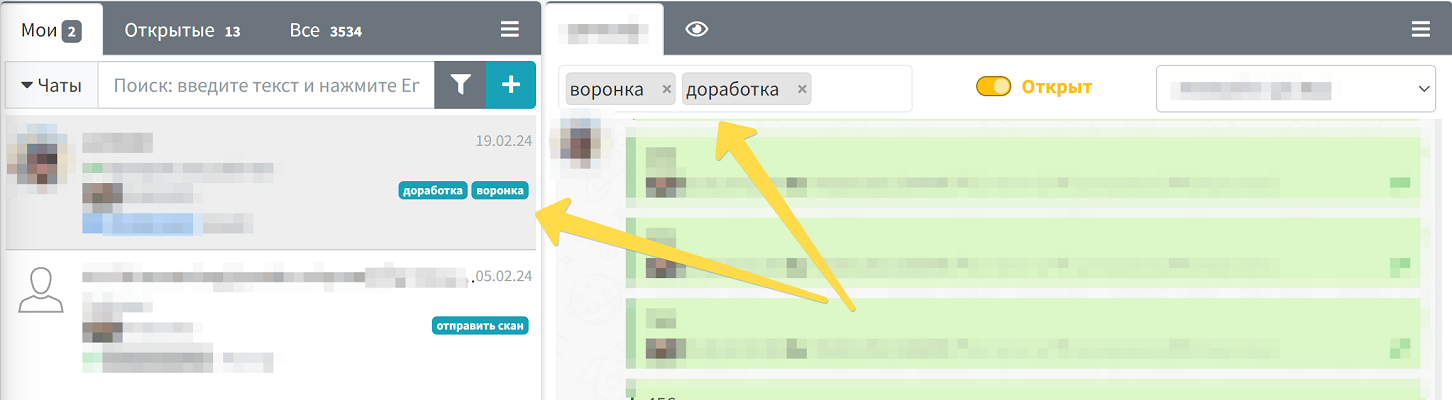
To add a tag, open the desired chat and locate the "Tags" section in the upper left corner of the dialog window. Enter the text of the new tag and press Enter. The system will also suggest selecting from a list of existing tags, which helps maintain a unified chat labeling standard across the company.
To remove a tag, simply click the cross icon next to it in the open dialog window. Tags remain available for selection in the system as long as at least one chat has that label.
Added tags are automatically displayed in the chat list, allowing instant identification of the inquiry type or its status without the need to open each conversation.
Practical Use Cases for Tags
In customer support:
- Marking urgent inquiries with the "Urgent" tag
- Categorizing by issue type: "Technical issue", "Billing question", "Consultation"
- Tracking status: "In progress", "Awaiting customer response", "Resolved"
In sales:
- Customer segmentation: "VIP", "New customer", "Potential"
- Deal stage marking: "Negotiation", "Approval", "Closed"
- Tracking customer interests: "Interested in Product A", "Price inquiry"
The tagging system is integrated with the Chat Filter, allowing quick display of all conversations with specific tags. This is particularly useful when working with a large number of active conversations.
For business process automation, you can also use the WAMM.chat API to programmatically manage tags and retrieve lists of chats with specific labels.