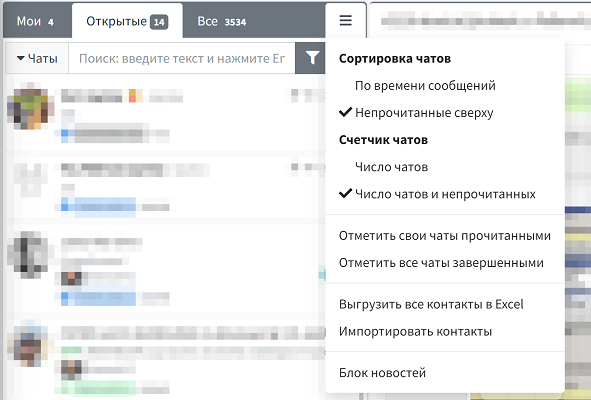
WAMM.chat offers two main chat sorting methods that help effectively organize your workspace based on your priorities:
- Sort by message time
In this option, chats are arranged in chronological order. Dialogues with recent messages (incoming or outgoing) appear at the top of the list. This sorting is particularly useful for teams working on a "first-come, first-served" basis and makes it easy to track current requests.
- Sort by unread messages
In this mode, chats with unread messages are moved to the top of the list, while other dialogues are arranged below in chronological order. This option is ideal for support teams where it's important to respond promptly to new requests without missing any unread customer messages.
Additionally, WAMM.chat implements a "Pin chat" feature that allows prioritizing certain dialogues at the top of the list regardless of the selected sorting mode. Pinned chats will always appear first, followed by others according to the chosen sorting method. This is convenient when working with VIP clients, urgent requests, or recurring inquiries requiring constant attention.
Practical Application
The flexible sorting system helps solve various business tasks:
For support teams — the unread messages sorting mode enables faster responses to new customer requests and reduces waiting time.
For sales managers — the chat pinning feature keeps important negotiations visible, while chronological sorting helps track recent interactions with potential clients.
For managers — combining different sorting methods optimizes team workflows and controls request processing.
Sorting settings are available in the User Profile or through the chat list menu, allowing each employee to choose the most convenient way to organize their workspace.
Effective use of chat sorting in WAMM.chat directly impacts customer service productivity and quality, especially with high volumes of requests across various messengers.