You can create a bot in the MAX messenger for free and connect it to WAMM.chat as a communication channel. This bot will allow you to receive messages from MAX users and reply to them, send files and images. You can connect any number of operators and handle customer correspondence together. For integration and connection, you only need your MAX Bot token. If you don’t have a bot yet, you can create one by following the MAX Bot creation guide.
What is MAX?
 MAX is a modern Russian messenger for fast and convenient messaging that works across all devices. MAX has a built-in platform for creating mini-apps and chatbots, making it a handy tool for businesses.
MAX supports all types of messages, including video, photos, and files. The app is available for mobile (iOS and Android), macOS, Windows, and via a web interface.
Connecting MAX Bot to WAMM.chat
- Go to the Settings section, click the "Add Communication Channel" button, and select "MAX Bot".
In the pop-up window, click "Add", enter your bot’s token (a string like: AAHdqTcvCH1vGWJxfSeofSAs0K5PALDsaw), and click "Send".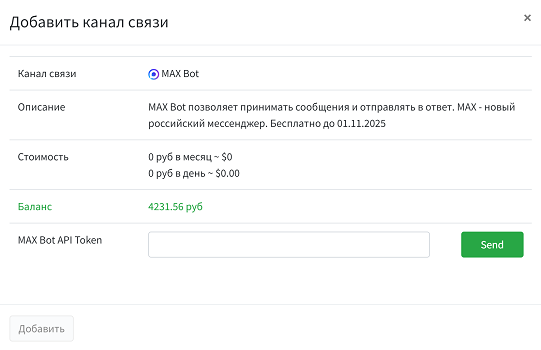
If the token is valid, a communication channel will be created, and you’ll be able to receive messages from MAX users in WAMM.chat. - After connecting, your bot will be automatically configured to work with WAMM.chat. The bot’s name, description, and avatar can be changed via @MasterBot in the MAX messenger.
How to start communicating with users
- MAX Bot is an inbound channel: you cannot initiate a conversation first. To start a chat, a MAX user must message your bot.
- Users can find your bot by searching for its name (@your_bot) or via a direct link:
https://max.ru/your_bot - The user identifier is their internal MAX ID, not their phone number.
Managing an existing bot
- Open the MAX messenger and find @MasterBot
- Use the following commands:
- /get_token — view the current token
- /refresh_token — generate a new token
- /revoke — revoke the current token
- To change the bot’s name, description, or avatar, use the corresponding commands in @MasterBot
MAX Bot features
- MAX Bot supports sending text messages, files, and images
- MAX Bot supports message editing and deletion
- A user can block the bot, after which you won’t be able to send them messages
- You can connect multiple MAX bots and manage them from a single WAMM.chat account
- You can connect a MAX bot to WAMM.chat and other services simultaneously; they can work with the bot in sync
For more details on working with MAX Bot, refer to the MAX developer documentation.