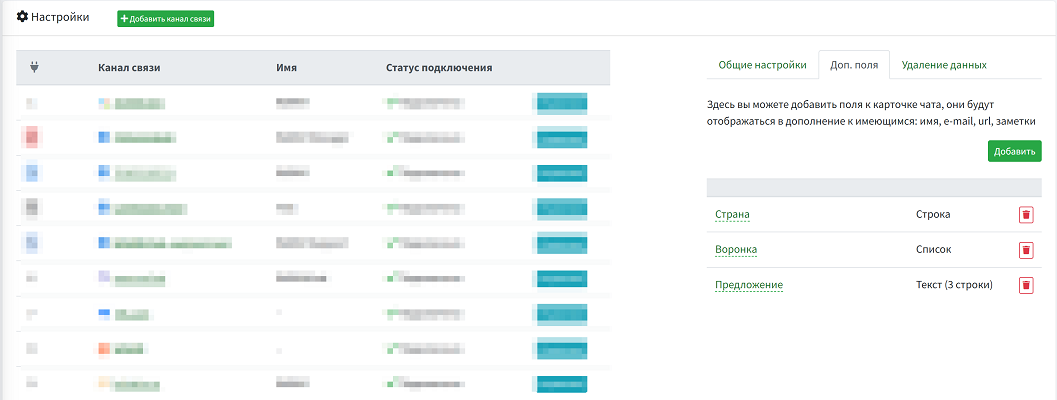
The WAMM.chat service offers the ability to add custom additional fields to the chat card on the "Info" tab. This is convenient for businesses that actively interact with customers via messengers, enhancing personalization and service quality. It is suitable for teams that need structured work on dialogues. This functionality allows for flexible adaptation of the service to business tasks, improving the efficiency of message processing and customer interaction.
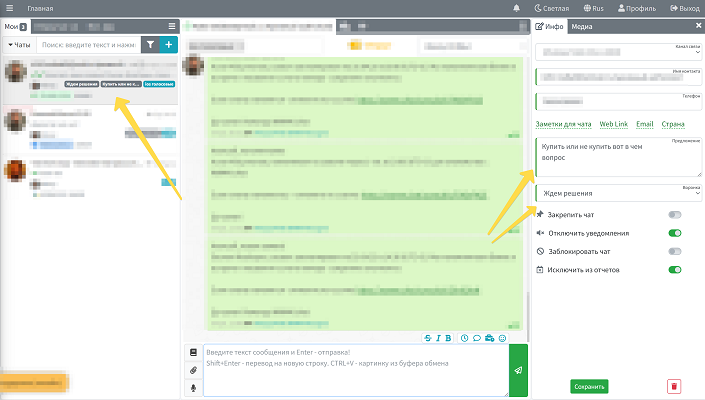
Fields can be created with various data types, including:
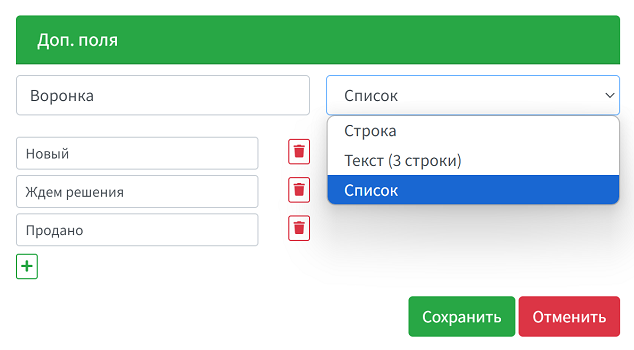
- String: For entering short text or individual values.
- Text field: Suitable for entering extended text information, such as notes.
- List: Allows selecting a value from a predefined set of options.
Additional fields provide a wide range of possibilities:
- Creating a sales funnel: For example, using additional fields to define the current stage of the funnel (lead, negotiation, deal, etc.).
- Managing statuses: Adding fields to indicate chat status (active, resolved, requires attention).
- Filling in unique information: The ability to add specific data about a customer or chat, such as preferences, task deadlines, or agreements.
- Analytics and reporting: Systematizing data for subsequent analysis and report generation.
How to Manage
Adding and editing additional fields is available to Account Administrators. The fields are displayed for all chats and all users. Each user can also enable the display of additional fields in the chat list in their Profile - this adds even more clarity when working with chats.
- Adding fields:
In the Settings section, select the tab for managing additional fields.
Set the name, data type, and parameters (e.g., options for lists). - Editing or deleting:
In the additional fields settings section, you can modify their properties or delete unnecessary ones.
- Filling in:
Fields are displayed on the "Info" tab in the chat card, where an operator can manually enter or edit data.