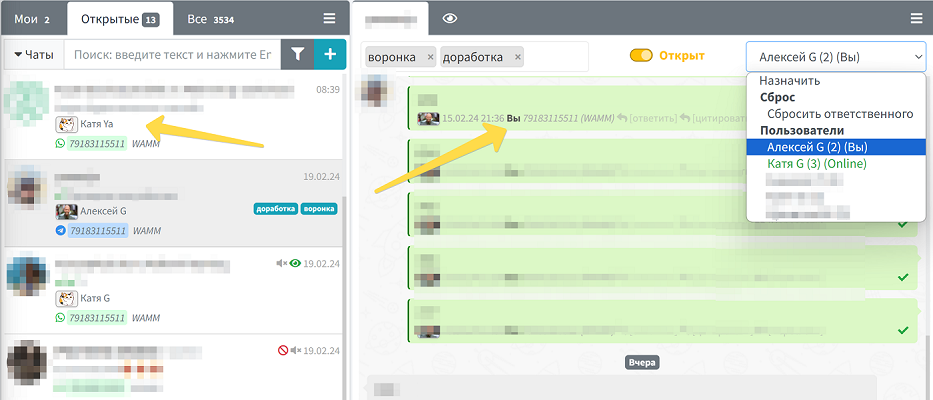
The chat responsible is a program user who manages the conversation in a specific chat. Their name and, if available, avatar are displayed in the chat list under each of their sent messages. This feature is one of the key tools for effectively organizing the work of a support or sales team.
Benefits of Assigning Chat Responsibles
The chat responsible assignment feature becomes critically important when a company has multiple employees handling numerous requests or managing specific clients. Proper responsibility distribution allows:
- Eliminating situations where no one responds to a client
- Preventing duplicate responses from different employees
- Ensuring a personalized approach to each client
- Evenly distributing workload among employees
- Tracking each employee's performance efficiency
- Creating a complete history of communication with the client
How a Responsible is Assigned
There are several ways to assign a chat responsible in WAMM.chat:
- Automatic assignment - the user automatically becomes responsible upon sending the first message in a new chat.
- Manual assignment - an administrator or another user can manually assign a responsible by selecting them from the list in the top-right corner of the chat window.
- Group assignment - if User Groups are configured, a chat can be assigned to a group, and the system will automatically select a specific responsible based on a predefined algorithm.
Additionally, the responsible can be changed at any time, or this feature can be completely deactivated for a specific chat.
Important: A responsible can only be assigned to personal chats. For group chats and channels, this feature is unavailable due to their structure and purpose.
Configuring Notifications for Responsibles
In the Profile section, each user can flexibly configure notifications for new messages:
- Notification channel selection - to the computer desktop (with or without sound) or to personal Telegram
- Notification filtering - users can receive notifications:
- From all chats
- Only from new (without a responsible) chats and those where the user is the responsible
- Only from their own chats (where the user is the responsible)
This flexible notification system allows each employee to configure alerts according to their tasks and avoid information noise.
Automatic Reset of the Responsible
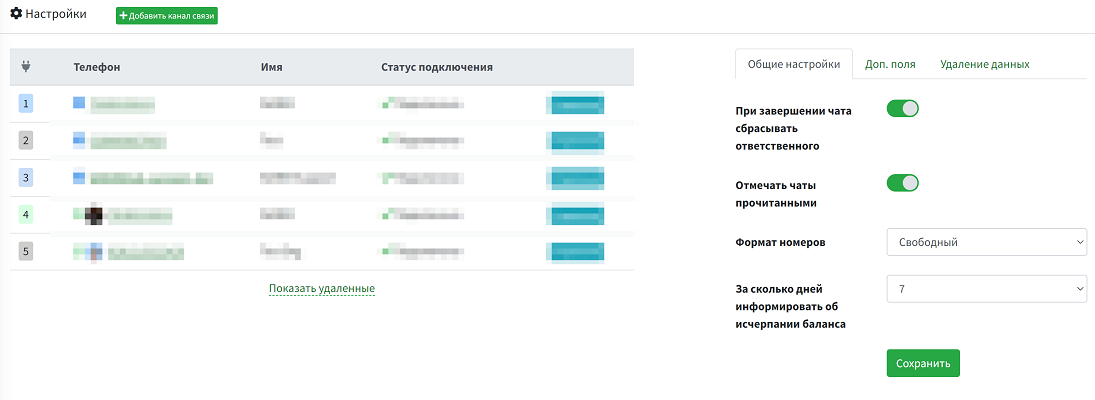
WAMM.chat has a useful setting that allows automatically resetting the chat responsible when the chat is closed. This is especially convenient for support services, where after resolving a client's issue, the chat is closed, and if the same client contacts again, their request can be handled by any available operator.
By default, this setting is disabled. Only a user with the Administrator role can enable or disable it in the Settings section.
Integration with Other Features
The responsible assignment feature is integrated with other WAMM.chat capabilities:
- Chat filtering - chats can be filtered by the responsible user
- Reports - analyzing each employee's performance based on their chats
- API - programmatically assigning responsibles through integrations with external systems
Business Use Cases
The "Chat Responsible" feature works effectively in various business scenarios:
- Sales department - assigning managers to specific clients to handle deals from first contact to completion
- Support service - distributing inquiries among operators considering their workload and competencies
- Multi-level support - reassigning complex issues to second-line specialists
- Educational projects - assigning teachers to students for personalized learning
- Medical consultations - distributing patients among doctors of different specializations
Proper organization of work with chat responsibles helps improve customer service quality and team efficiency, directly impacting your business success.