From the Settings section, you can proceed to manage the communication channel.
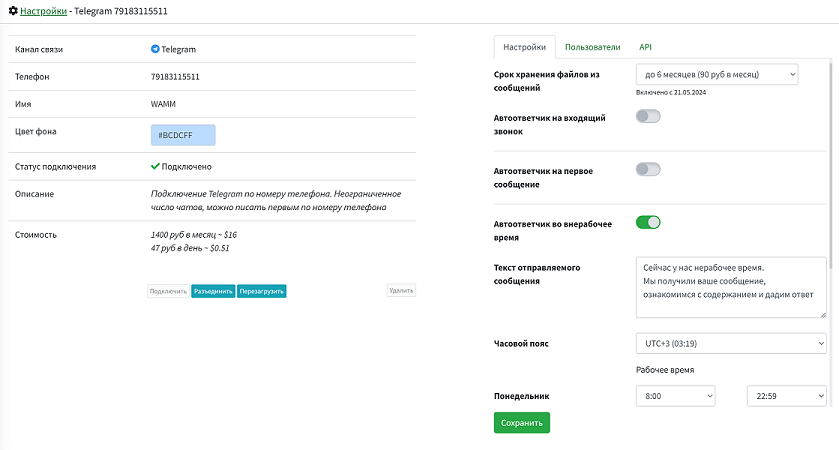
Current connection data is displayed here, you can perform a number of actions, and also configure some options:
- A communication channel can be disconnected, connected, reloaded, deleted, or restored.
- Channels can be assigned a display name and marked with a color.
This allows for a clearer representation of contacts in the chat list.
- Media/file storage period from messages
By default, files from messages are stored for up to 2 months, and this is included in the tariff. You can increase this period to 6 months. Depending on the setting, new (!) files are saved to different storages with deletion periods of 2 or 6 months. For previously uploaded or sent files, the storage period cannot be increased, and files cannot be transferred between storages.
- You can configure - Auto-reply to incoming calls.
Our program cannot receive audio and video calls, but thanks to this option, you can set the text of a message that will be automatically sent to a call in the messenger. This way, you can inform the caller that you only accept text and voice messages.
- Auto-reply to the first message.
Allows you to specify the text of a message that will be sent to the first incoming message from a client within a day or another period you specify in the option - Send no more often than.
- Auto-reply outside working hours.
Allows you to specify the text of a message that will be sent to the first incoming message from a client outside working hours. For it to work, you will need to specify your time zone and working hours by day of the week.
- Load contacts and messages upon connection.
By default, for WhatsApp and Telegram messengers, this option is enabled, and when establishing a connection or reloading a connection, chats and messages from the last few days are loaded.
By default, all account users are allowed to use all channels. On the Users tab, you can change this: restrict access.
On the API tab, you can obtain or change the API Token and set the Webhook URL for automation and integration with your systems. This section is available to Administrators. In the corresponding section, read more about the API.