The chat filtering function in WAMM.chat allows you to efficiently manage large lists of conversations and quickly find the chats you need. By default, the chat list is sorted by the time of the last message or by the presence of unread messages - these settings are available in the User Profile or via the chat list menu.
Filtering Parameters
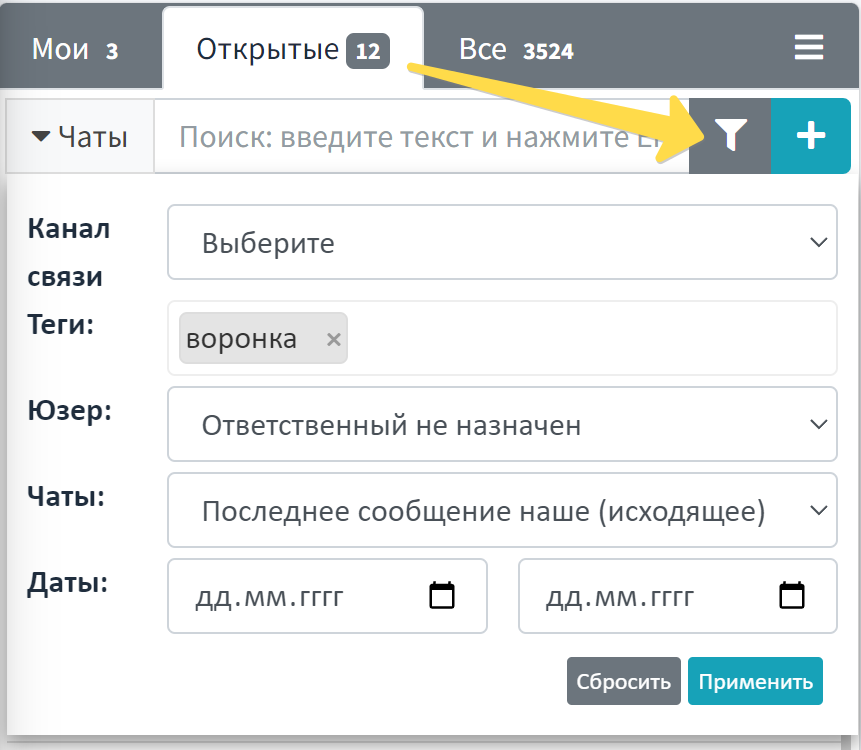
For a more precise search of the necessary conversations, you can use the following filtering parameters:
- Communication Channel - allows you to display chats only from the selected messenger (WhatsApp, Telegram, Telegram Bot, Avito)
- Tags - display chats with specific tags that you assigned earlier
- User - filter by the employee who sent messages in the chat
- Messages - the ability to filter chats without messages or chats where the last message was incoming or outgoing
- Message Date - show chats that had activity within a selected time period
How to Use the Chat Filter
To activate filtering:
- Click the funnel icon button located above the chat list
- In the window that opens, select the necessary filtering parameters
- Click the "Apply" button to activate the filter
- To cancel filtering, use the "Reset" button
Filter Operation Features
It is important to note that the filter is applied to the currently active tab (Mine, Open, All). When switching between tabs, the filter is preserved and applied to the content of the new tab.
Practical Application
Chat filtering is especially useful in the following business scenarios:
- For support service - quick search for requests by specific tags or filtering by period to analyze peak loads
- For sales department - tracking chats with potential clients by tags like "Potential Client", "Requires Response", etc.
- For managers - analyzing employee work by filtering by users who sent messages
- During handover - filtering chats without a response or with incoming messages for prompt processing of unhandled requests
The filtering function is closely related to other chat organization tools in WAMM.chat: chat sorting, the tag system, and assigning responsible persons. By combining these functions, you can create an effective system for managing customer inquiries.
Use chat filtering to increase work productivity and reduce the time spent searching for the necessary information, especially when there is a large number of active conversations.