In the WAMM.chat interface, the "My," "Open," and "All" tabs display numerical counters showing the number of chats in each category. This feature helps quickly assess workload and the distribution of conversations.
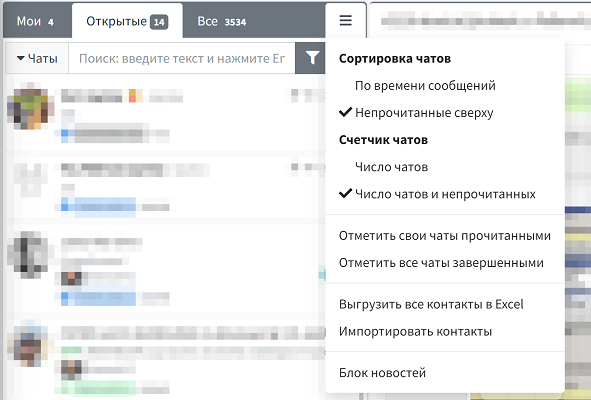
For convenient work with a large number of chats, the service offers settings for displaying counters. You can choose one of two modes:
- Show the total number of chats on each tab
- Show both the total number of chats and the number of unread messages
The second option is especially useful for support services and sales departments, where it is important to promptly track new customer inquiries.
You can configure the display of counters in two ways:
- Through the additional menu above the chat list (quick access)
- In the user's Profile section
Personal settings are saved for each user, allowing different employees to configure the interface according to their preferences and work tasks.
This feature is closely related to chat sorting and notification settings, forming a comprehensive approach to organizing the workspace in WAMM.chat.