Bulk messaging via messengers WhatsApp, MAX, and Telegram using the WAMM.chat program is a fast and effective way to improve interaction with your customers.
Capabilities of our messenger broadcasting service: sending via WhatsApp, MAX, and Telegram; setting the time and interval for sending; personalizing messages; attaching files and images.
Contact sources:
- Upload from an Excel file, file structure (Example files: with text, with fields, only numbers):
- Column "Phone" (required)
- Column "Message" and additional optional columns for personalization
- Upload from the WAMM.chat database
- Manual contact entry
Do not send SPAM broadcasts, only send messages to your customer base who have given consent to receive broadcasts. Also, consider the risks that your number may be blocked by messenger moderators. This can happen if recipients file complaints about your messages. Read the note Risks of Messenger Broadcasts.
You need to register and connect your WhatsApp, MAX, or Telegram number in the Settings section. You can connect any number of numbers for broadcasting or send broadcasts from different numbers. Go to the Message Broadcasting section and then follow simple steps.
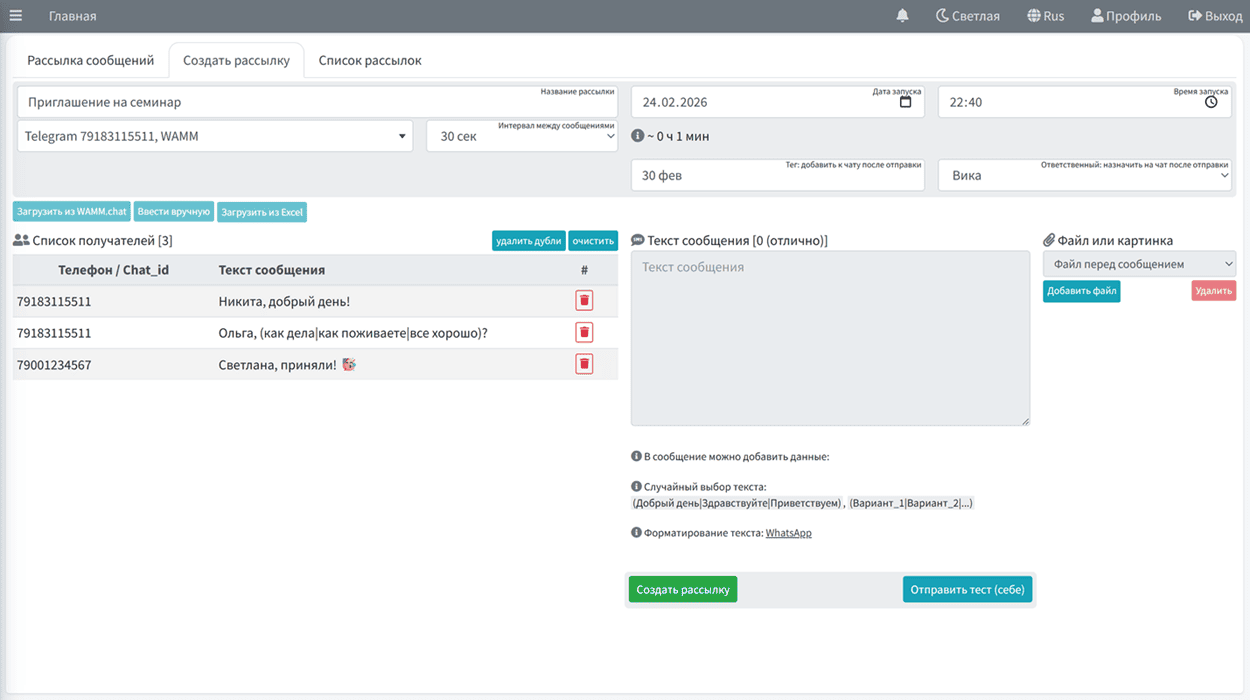
Process of creating a broadcast for a customer base:
- Selecting a communication channel (WhatsApp, MAX, Telegram)
- Determining the start time and sending interval
- Uploading the recipient list
- Entering the message text
- Using a common template
- Text from the imported file
- Adding files or images
- You can assign a tag and a responsible employee to chats from the broadcast
- Starting the broadcast
- Viewing the broadcast progress report (sent, delivered, received a response)
Phone numbers for broadcasting must be in international format (i.e., for Russia +7*** or 7***).
Before sending, the phone number is checked for presence in your contacts, and if it is not in your contacts, it is checked whether the number has WhatsApp, MAX, or Telegram.
The message text in broadcasts can contain up to 1500 characters.