The Settings section is designed for connecting messengers - communication channels and configuring their operating parameters.
To add a channel, click the green "Add Communication Channel" button and select a messenger, but adding new channels is only available to users with the "Administrator" role. You can add any number of messengers and they will work simultaneously. Channels can be added and deleted at any time - the program uses daily billing.
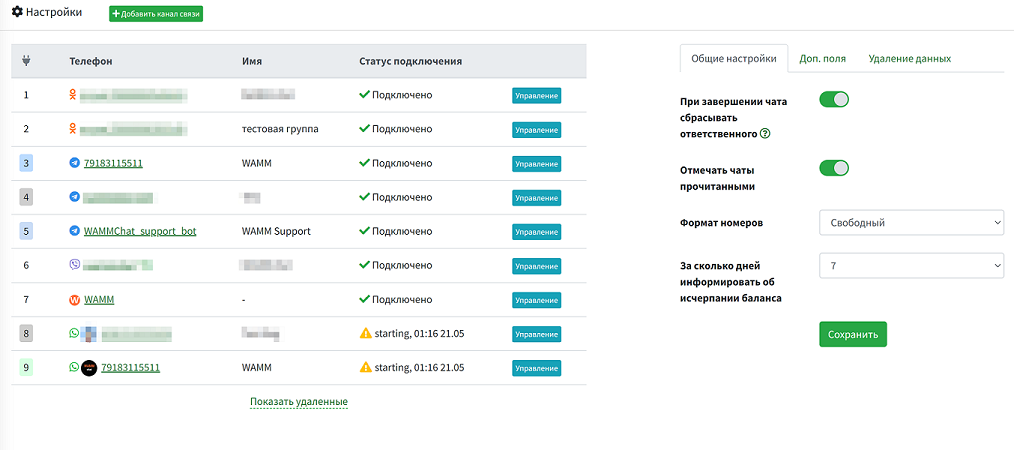
This section displays the connected communication channels - messengers, their numbers, names, and connection status.
You can also configure some general settings, such as:
- Reset the responsible person when closing a chat
Chats have a status (Open/Closed) and a Responsible person for the chat. When this setting is enabled, the responsible person will be reset when the chat is closed. Thus, when correspondence in the chat resumes, the chat will be available to a larger number of users, not just the responsible person.
- Mark chats as read
If a client has sent you messages, when you open the chat to view them, the client's messages will be marked as read.
- Phone number format
This setting defines the input mask for phone numbers when creating new chats (+7...) or no mask is applied, allowing any numbers to be entered.
- How many days in advance to notify about balance depletion
We send a notification via email 1 day before disconnection, as well as the number of days specified in this setting.
Additional Fields
Here you can add additional fields to the chat card. They will be displayed in addition to the existing ones: name, e-mail, url, notes. Fields can be of several types and are available for all chats. For more details, visit the additional fields page.
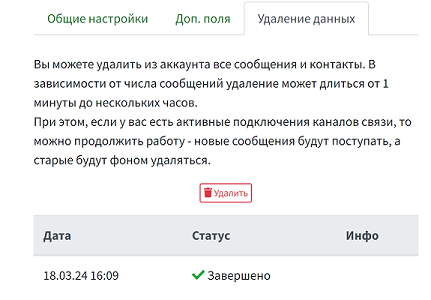
Data Deletion
With this function, you can delete all messages and contacts from the account. If you have active communication channel connections, you can continue working - new messages will be received, while old ones (prior to initiating data deletion) will be deleted in the background.