Scheduled message sending is a feature that allows you to compose a message now but send it at a pre-determined time in the future. This is an indispensable tool for businesses that work with clients across different time zones, run marketing campaigns, or simply aim to optimize workflows.
WAMM.chat supports scheduled message sending for messengers: WhatsApp, Telegram Personal, Telegram Bot, Max Personal, Max Bot, and Avito. It's important to note that standard messengers do not support such scheduling functions, making this a unique solution for business.
How the Scheduled Sending Feature Works
To set up scheduled message sending, you need to:
- Open the chat window with the desired contact or group
- Click on the icon with the blue clock in the text input field
- In the window that appears, specify the desired date and time for sending
- Click the green button with a checkmark to confirm
- Enter your message text and send it
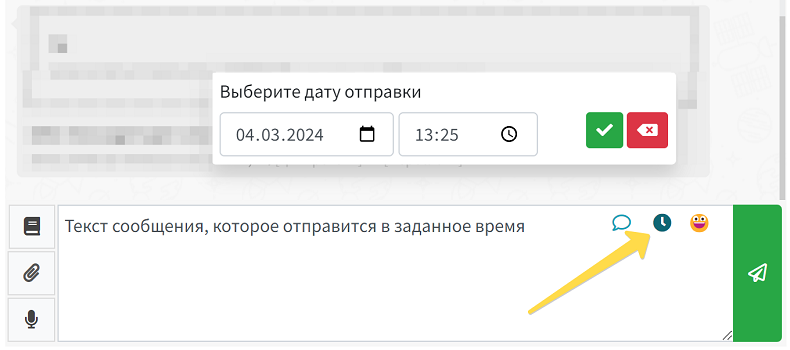
If your plans change, you can easily cancel a scheduled send:
- Simply click on the red arrow with a cross
- The message will be removed from the sending queue
- No additional confirmation is required
Sending to Groups and Post Scheduling
One of the main advantages of WAMM.chat is the ability to send messages to groups with the scheduled sending function. This means you can: schedule posts for groups; create a content plan for corporate groups; publish announcements at optimal times; maintain community activity even outside business hours; send important notifications to the entire team.
By utilizing message scheduling capabilities for both personal chats and group communications, your business gains a competitive advantage through automated, personalized, and timely communications with clients and partners.