Message templates are pre-written texts and files that can be quickly inserted into customer correspondence. They help save time on typing frequently repeated messages and ensure a uniform communication style for all company employees.
Benefits of Using Templates
The template function significantly improves communication efficiency:
- Reduces response time to standard customer questions
- Ensures uniformity in responses from all employees
- Reduces the number of errors in responses
- Allows storing and instantly sending complex structures with files
- Simplifies the work of new employees who are not yet familiar with all the information
How to Create and Use Templates
You can create a template directly in the chat window:
- Click the button with the book icon near the text input field
- Select "Add"
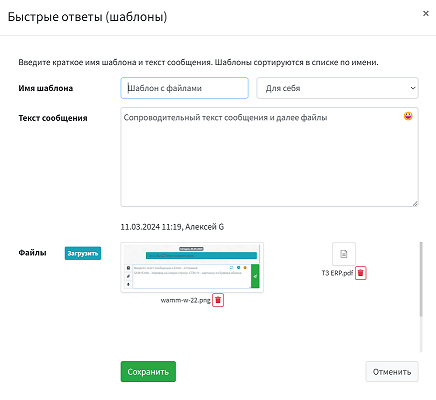
- Enter the template name (it will be displayed in the list)
- Choose who will have access to the template: only you or all users
- Enter the message text
- Add files if necessary
- Click "Save"

Template Capabilities
Templates in WAMM.chat can contain:
- Text with emojis and formatting
- Files and images
- Documents and presentations
This allows creating comprehensive templates for various situations: sending price lists, directions, product catalogs, instructions, and other materials. Files are sent in the order they were added to the template.
Organizing and Searching Templates
For ease of use, templates are organized as follows:
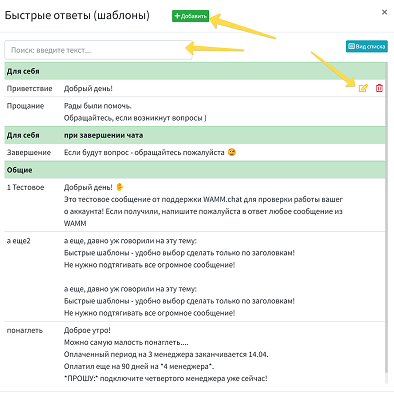
- Personal templates (accessible only to you) are displayed at the top of the list
- General templates (accessible to all users) follow below
- Within each group, templates are sorted alphabetically
A search bar is provided for quickly finding the right template, which searches for matches in both template names and their content.
Message Signature Template
A special type of template is the signature, which is automatically added to the end of every outgoing text message. This can be employee information (e.g., "Best regards, Manager Egor"), contact details, or any other standard information.
When the signature is active, a "signature" indicator is displayed in the text input field. Clicking this indicator allows you to disable the signature for a specific message. To completely disable the signature, you need to delete the corresponding template.

Practical Application of Templates in Business Processes
For Support Service:
- Greeting new customers
- Answers to frequently asked questions
- Instructions for solving typical problems
- Informing about request status
For Sales Department:
- Presentation of goods and services
- Sending price lists and catalogs
- Information about promotions and special offers
- Answers to questions about delivery and payment
For HR Department:
- Answers to candidates' questions
- Sending application forms and test tasks
- Company information for applicants
Connection with Other WAMM.chat Functions
The template function is closely integrated with other platform capabilities:
- Sending Messages — templates are available directly from the chat window
- Assigning Chat Responsible Persons — allows personalizing templates depending on who is conducting the dialogue
Using templates is a simple and effective way to standardize customer communication and make operators' work more productive. Regularly updating and expanding the template database helps maintain high-level communication and respond promptly to changes in business processes.