The program can be paid for using various methods:
- Online payments with immediate crediting to the balance:
- Cards from Russian banks
- Cards from foreign banks
- SBP (QR)
- YooMoney
- YooPay
- MTS Pay
- By invoice - bank transfer with funds credited upon actual receipt.
To make a payment, go to the Payment section, specify the required number of channels - messengers, the number of users, and select the paid period - from 15 to 180 days. The amount to be paid will be shown. Then, choose a payment method and proceed to "Pay" or "Download Invoice".
When selecting the payment method - "Invoice for Legal Entities, Sole Proprietors", you will be prompted to enter the legal entity details and will be able to download the invoice immediately.
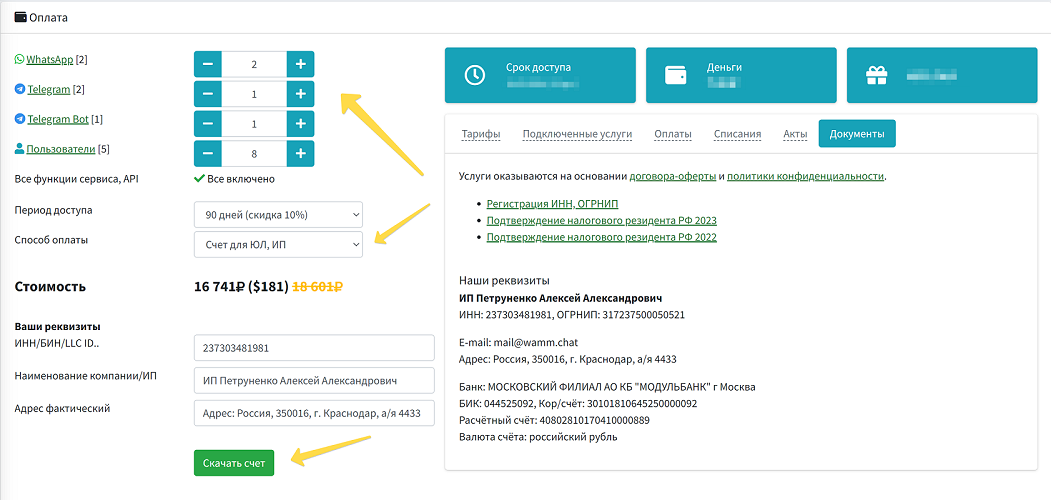 Payment section
Account payment can be made at any time and using different methods, alternating these payment methods (for example, by card now, and by invoice for the next period, or simultaneously). Moreover, one account can be paid for by different legal entities, also at any time; in this case, funds are debited from the balance proportionally from each Taxpayer Identification Number (INN).
When paying by bank transfer via invoice, it is important to pay the invoice with the legal entity to which the invoice was issued and for the full amount on the invoice, not in parts. In this case, payments are credited automatically upon receipt of funds to our settlement account.
Services are provided based on the public offer agreement and the privacy policy.